
CC5 – Cross Connector 5
SAP changes and transports right in Jira
Start, approve and track them without switching systems, with no need for ChaRM.
The challenge
Two systems, one change
Business and development plan requirements in Jira. Transport requests, approvals and imports, however, run in the SAP system or in SAP Solution Manager. Anyone who wants to know where a change stands has to ask or search two systems.
Every switch costs time and creates copies: transport numbers are pasted into tickets, status is reported by email, approvals are collected in lists. At the next audit, the link between requirement and transport is missing.
Double maintenance
The same change lives in Jira and in SAP, often with a different status.
Approvals on the side
Approvals run through email or Excel and are hard to prove later.
An open future
With Solution Manager maintenance ending in 2027, ChaRM drops out as the steering tool.
The solution
Jira becomes the control centre for SAP changes
CC5 adds SAP functions to Jira. Your teams start, approve, monitor and analyse changes, incidents and transports in Jira without switching systems.
Your existing processes stay as they are. The connector adapts to them, and later adjustments work without consultants.
Changes from Jira
The Jira issue is the starting point. From there you create transport requests and follow them through to import.
Approvals with evidence
Approvals stay in Jira. Automation saves manual steps, and every decision is documented for audits.
Transports in view
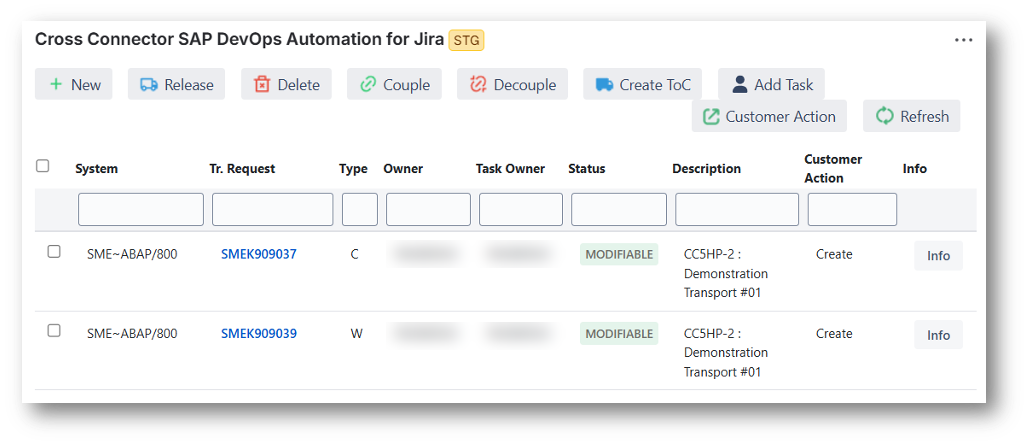
Transport requests appear in the issue with status and description. The numbers are links that open the request in the SAP system.
How it works
From Jira issue to import
1
Create the issue
A requirement, change or incident starts as a Jira issue, in your team’s workflow.
2
Create the transport request
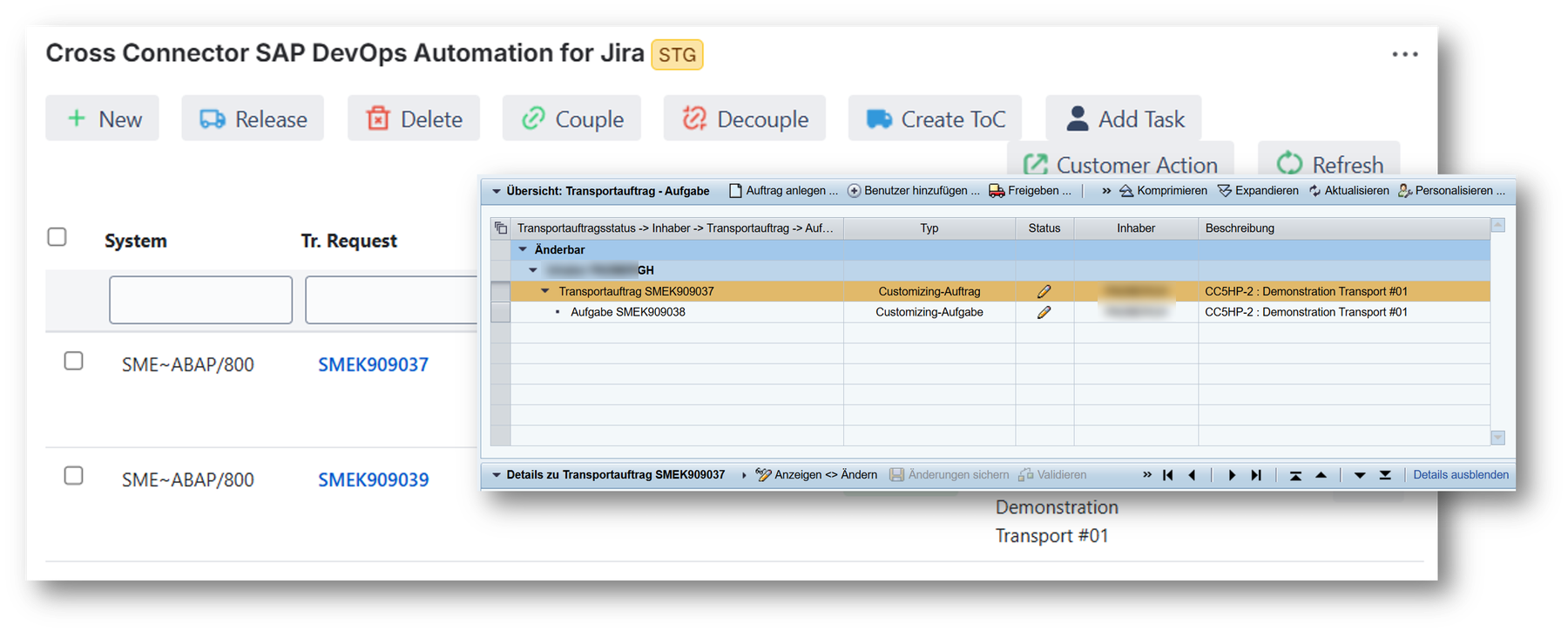
You create the transport request from the issue. It appears in the Jira issue and in SAP Transport Management.
3
Develop in SAP
Development works in SAP as usual. Clicking the request number in the issue opens the request in the SAP system.
4
Release transports
You give approvals in Jira. The decision is documented in the issue.
5
Track the status
You see the status of every transport in the issue. Business and IT know where a change stands without checking SAP.
Prerequisite: To connect, you install an add-on in SAP Solution Manager or directly in the SAP development system.
After 2027
Keep working when Solution Manager goes
According to SAP, mainstream maintenance for Solution Manager ends in 2027 (SAP Support). For many SAP teams, this means ChaRM drops out as the steering tool for changes and transports.
CC5 does not depend on Solution Manager. The add-on can also be installed directly in the SAP development system. Jira stays the central source for all IT changes, including SAP, and your teams do not have to learn a new process.
More on the end of Solution Manager: What to do now →
At a glance
Technology, trial and price
| Jira | Cloud, Data Center and Server |
| SAP | Add-on in SAP Solution Manager or in the SAP development system |
| Trial | 30 days free of charge, with technical support from Cross ALM |
| Price | Free in Jira Cloud for up to 10 users, priced by user count above that. Current prices on the Marketplace |
| Support | Monday to Friday, 9am to 5pm CET, except German public holidays |
| In use | More than 30 installations on the Atlassian Marketplace |
Price for your team
Atlassian Marketplace prices in US dollars, excluding taxes. As of 19 Nov 2026.
In practice
Projects and background
Success story
HUK-COBURG
ITSM and ChaRM items used to be copied into Jira by hand. Today the team creates, releases and imports transport requests in Jira. ChaRM is no longer needed as an intermediate layer. Project duration: 8 weeks.
Success story
Deutsche Bahn
DevSecOps for SAP with ChaRM: critical authorisations are checked automatically before import.
Webinar
DevOps with Jira and SAP
The concept, use cases in SAP projects and a live demo of the transport integration.
Vendor
Developed by Cross ALM
Cross ALM develops CC5 in-house and supports implementation and operation. Since 2015, the team has connected SAP processes with Atlassian and ServiceNow tools.

Atlassian Gold Solution Partner
Rising Star EMEA Partner of the Year 2022, with the Service Management Specialization.

SAP Silver Partner
Focus on application lifecycle management, from planning to operation.

One point of contact
Product, implementation and support from one source, with more than 25 people in Berlin.
Get started
Three steps to your pilot
Before you decide, you see CC5 in your own landscape.
1 · Conversation
You describe your system landscape and requirements and see CC5 in a demo based on your case.
2 · Pilot project
For 30 days you run a free licence in your landscape, with technical support from Cross ALM.
3 · Decision
Together you review whether the pilot delivered the expected value.
FAQ
What to know about CC5
Do we need SAP Solution Manager?
No. The CC5 add-on runs in SAP Solution Manager or directly in your SAP development system.
Which Jira versions does CC5 support?
Jira Cloud, Jira Data Center and Jira Server.
Do we have to change our processes?
No. CC5 adapts to your existing processes. Later adjustments work without consultants.
What does CC5 cost?
In Jira Cloud, CC5 is free for up to 10 users. Above that, the price depends on the number of Jira users; from the 101st user on, each additional user costs USD 0.01 per month. The price calculator above shows the amount for your team. Current prices are on the Atlassian Marketplace.
From the end of SolMan in 2027 to an agentic tool chain for SAP landscapes
How SAP teams plan the move and connect SAP, Jira and ServiceNow into one tool chain.
Contact
Let’s talk about your project
Tell us briefly what it is about, and you will hear from us personally.

What happens when you get in touch:
- A consultant gets back to you and clarifies your requirements
- Together with you, we analyse your processes and systems
- You receive a proposal for the next steps
You are currently viewing a placeholder content from HubSpot. To access the actual content, click the button below. Please note that doing so will share data with third-party providers.
More InformationPrefer to get in touch directly? Email solutions@crossalm.com or call +49 30 398 36 112.