
CC4 – CrossConnector 4
SAP Solution Manager and Jira in sync both ways
Change requests, changes and incidents with their current status in Jira.
The challenge
Requirement in Jira, delivery in Solution Manager
SAP Solution Manager is your leading system for changes, tests and approvals. Business, however, records requirements in Jira. Between the two systems, items are retyped and status is chased by email.
Teams want to work in an agile way in Jira, while change and quality control should stay in Solution Manager. Without a connection, you end up with two versions of the truth.
Double maintenance
The same change is maintained in Jira and in Solution Manager, often with a different status.
Unknown status
Whether a change is approved, tested or imported is not visible to the business in Jira.
Gaps in evidence
Comments and attachments are scattered and missing at the next audit.
The solution
Both systems on the same page
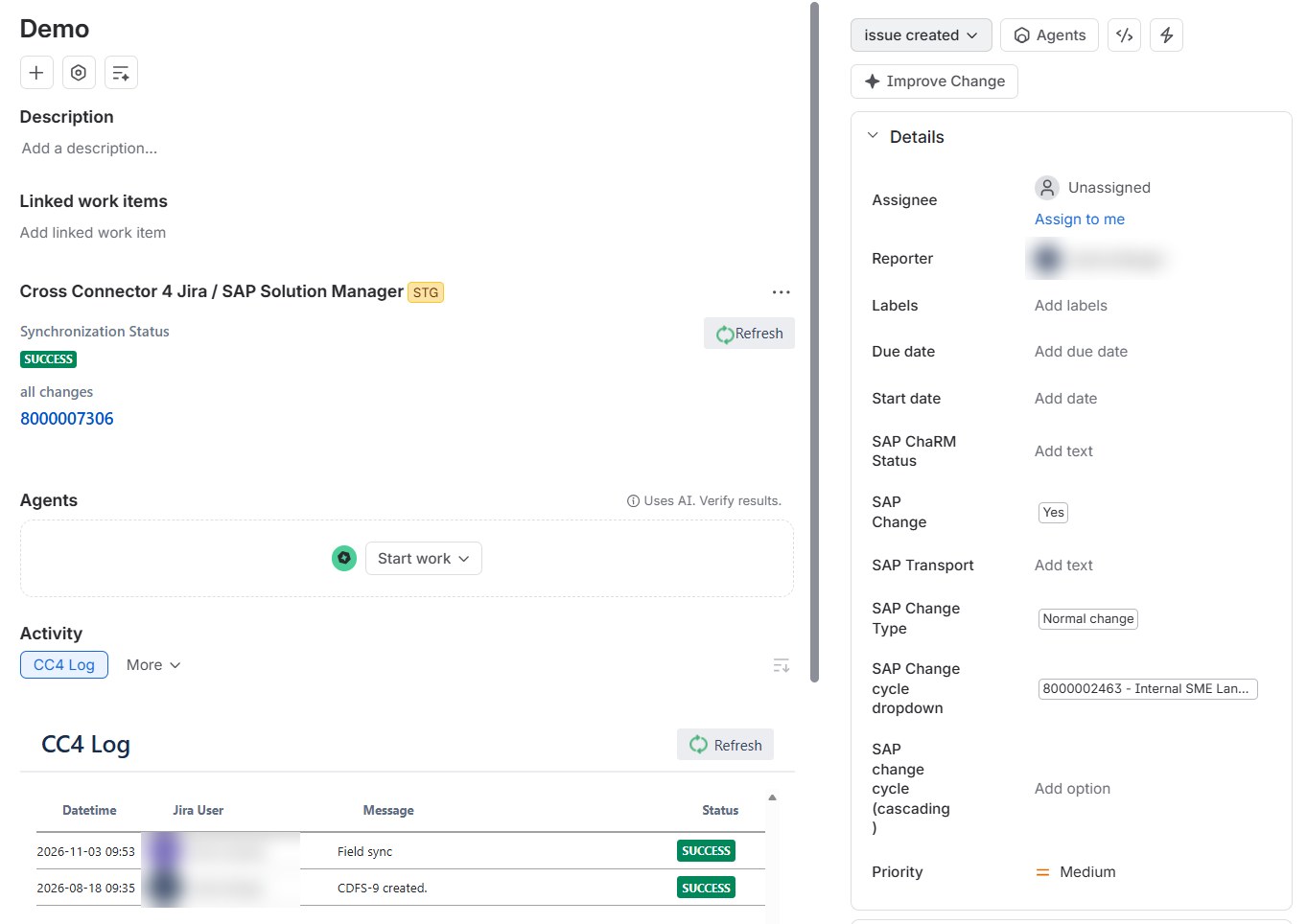
CC4 connects Jira with SAP Solution Manager. The progress of your change requests, changes and incidents appears in real time in the matching Jira issue, and changes from Jira flow back to Solution Manager.
Your existing change and defect processes stay. CC4 maps them instead of replacing them.
Both directions
Status changes, comments, custom fields and attachments are synchronised between Jira and Solution Manager.
Your processes
Change management, defect management, ITSM, requirements and Focused Build can be connected.
Evidence for audits
Every change is documented automatically. Automation in Jira saves manual steps and approvals.
How it works
From Jira issue to Solution Manager document
1
Issue in Jira
Business records a requirement, change or incident in Jira.
2
Document in Solution Manager
CC4 creates the matching document in Solution Manager. Fields and values are assigned through a mapping.
3
Processing in SAP
Approval, development and testing run in Solution Manager as usual, with its change and quality control.
4
Status back in Jira
Status changes, comments, fields and attachments flow both ways. Jira always shows the current status.
5
Fully documented
Every change is logged and ready for audits.
Use cases: change management, defect management, ITSM and requirements in Solution Manager as well as Focused Build with requirement to deploy.
Until 2027 and beyond
Connect today, switch tomorrow
According to SAP, mainstream maintenance for Solution Manager ends in 2027 (SAP Support). Until then, CC4 connects your teams in Jira with the processes in Solution Manager.
For the move there is a matching path: CA1 and CA2 secure the history from Solution Manager, and the C³ suite then connects SAP Cloud ALM with Jira. Your teams keep working in Jira throughout.
For SAP Cloud ALM: Go to the C³ suite →
At a glance
Technology, trial and price
| Jira | Cloud, Data Center and Server |
| SAP | SAP Solution Manager with ChaRM, ITSM, requirements and Focused Build |
| Direction | Both ways: status, comments, fields and attachments |
| Trial | 30 days free of charge, with technical support from Cross ALM |
| Price | Free in Jira Cloud for up to 10 users, priced by user count above that. Current prices on the Marketplace |
| Support | Monday to Friday, 9am to 5pm CET, except German public holidays |
| In use | More than 20 installations on the Atlassian Marketplace |
Price for your team
Atlassian Marketplace prices in US dollars, excluding taxes. As of 22 Nov 2026.
In practice
Projects and background

 Public sector
4 weeks
to integrate Jira into SAP Solution Manager processes
Success story
LAPP
An input form in identity management automatically creates service requests in Solution Manager through the existing CC4 interface. No extra cost for interface development was needed.
Blog
Jira in SAP projects
The benefits Jira brings to project management in SAP projects.
“With the help of the Cross Connector, we were able to integrate requirements, change and test management into Jira for all end users.”
Uwe HofmannGroup Lead SAP Application Support, BSR
Read the success story →
Vendor
Developed by Cross ALM
Cross ALM develops CC4 in-house and supports implementation and operation. Since 2015, the team has connected SAP processes with Atlassian and ServiceNow tools.

Atlassian Gold Solution Partner
Rising Star EMEA Partner of the Year 2022, with the Service Management Specialization.

SAP Silver Partner
Focus on application lifecycle management, from planning to operation.
One point of contact
Product, implementation and support from one source, with more than 25 people in Berlin.
Get started
Three steps to your pilot
Before you decide, you see CC4 in your own landscape.
1 · Conversation
You describe your system landscape and requirements and see CC4 in a demo based on your case.
2 · Pilot project
For 30 days you run a free licence in your landscape, with technical support from Cross ALM.
3 · Decision
Together you review whether the pilot delivered the expected value.
FAQ
What to know about CC4
Does CC4 sync in both directions?
Yes. Status changes, comments, custom fields and attachments flow back and forth between Jira and Solution Manager.
Which Jira versions does CC4 support?
Jira Cloud, Jira Data Center and Jira Server.
Which processes can be connected?
Change management (ChaRM), defect management, ITSM and requirements in Solution Manager as well as Focused Build with requirement to deploy.
What happens when Solution Manager is shut down?
CA1 and CA2 secure documents and test evidence as PDF beforehand. For SAP Cloud ALM, the C³ suite keeps your teams connected with Jira.
What does CC4 cost?
In Jira Cloud, CC4 is free for up to 10 users. Above that, the price depends on the number of Jira users; from the 101st user on, each additional user costs USD 0.01 per month. The price calculator above shows the amount for your team.
From the end of SolMan in 2027 to an agentic tool chain for SAP landscapes
How SAP teams plan the move and connect SAP, Jira and ServiceNow into one tool chain.
Contact
Let’s talk about your project
Tell us briefly what it is about, and you will hear from us personally.

What happens when you get in touch:
- A consultant gets back to you and clarifies your requirements
- Together with you, we analyse your processes and systems
- You receive a proposal for the next steps
You are currently viewing a placeholder content from HubSpot. To access the actual content, click the button below. Please note that doing so will share data with third-party providers.
More InformationPrefer to get in touch directly? Email solutions@crossalm.com or call +49 30 398 36 112.