
C³F for ServiceNow
SAP Cloud ALM and ServiceNow working from the same data
C³F connects features in SAP Cloud ALM with stories, features or change requests in ServiceNow. Changes flow in both directions, and SAP transports sit right on the record.
The challenge
The same change, two systems
Many organisations manage requirements, releases and changes centrally in ServiceNow. With the move from SAP Solution Manager to SAP Cloud ALM, SAP implementation gets a second system with its own features, statuses and transports.
Without a connection, teams maintain the same change twice. Project management and change management cannot see in ServiceNow how far a feature has got in SAP Cloud ALM, and SAP development does not know the priority set in ServiceNow.
Typical consequences:
- The same requirement exists in two systems, with different statuses
- Status from SAP Cloud ALM is passed on by email or in meetings
- Someone has to check by hand which transports belong to a change
- Audits lack an end-to-end trail from requirement to transport
The solution
One record, one shared status
C³F connects a feature in SAP Cloud ALM with a task in ServiceNow. You decide which ServiceNow record that is: a story, a feature, a change request or another task type.
Both records then stay up to date, whichever system someone works in. The related SAP transports appear directly on the ServiceNow record. Each team works in its familiar tool, and everyone sees the same status.
Synchronisation in both directions
Changes to title, description, status, priority, assignee and release go from ServiceNow to SAP Cloud ALM and back.
Transports on the record
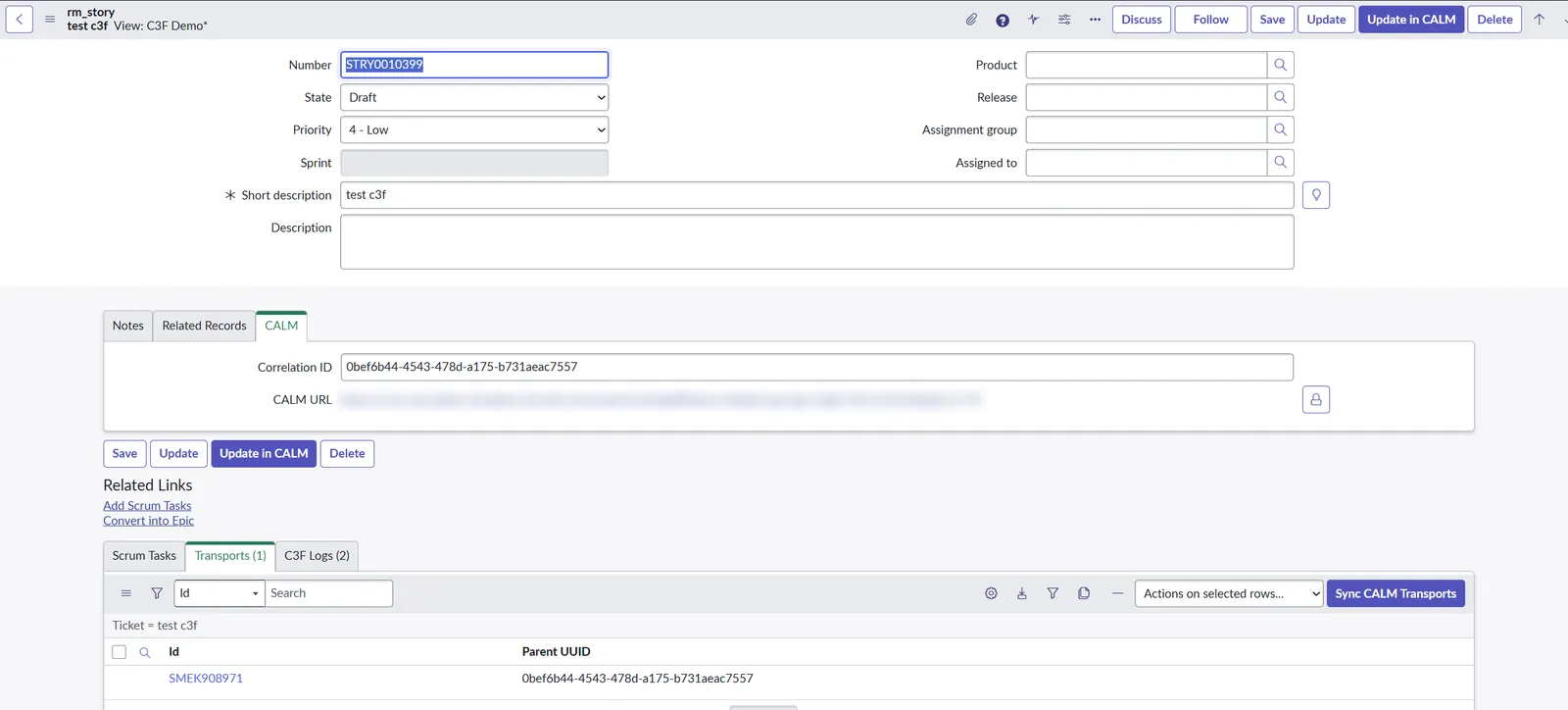
SAP transports are linked to the feature and the ServiceNow record and can be synchronised there at the click of a button.
Runs in ServiceNow
C³F is a scoped application in your ServiceNow instance, with no extra server in between.
In short: ServiceNow steers the process, SAP Cloud ALM handles the SAP implementation. C³F makes sure both sides know the same status.
How it works
From the ServiceNow record to the feature
1
Link
The ServiceNow record has its own tab for SAP Cloud ALM, showing the correlation ID of the linked feature and a direct link into SAP Cloud ALM.
2
Transfer
With “Update in CALM” you send changes on demand, and business rules in ServiceNow can do this automatically. Changes from SAP Cloud ALM come back through the integration.
3
Map
You define in ServiceNow which fields are synchronised. A mapping matches the status values of both systems, for example a status in ServiceNow to a status of the feature in SAP Cloud ALM.
4
Trace
Every synchronisation is recorded in a separate integration log that you can view directly on the record.
What you end up with
- Features in SAP Cloud ALM linked to stories, features or change requests in ServiceNow
- Title, description, status, priority, assignee and release in sync across both systems
- A status mapping that fits your processes
- SAP transports visible on the ServiceNow record
- A direct link from the ServiceNow record to the feature in SAP Cloud ALM
- An integration log for every synchronisation
- Support from the ServiceNow Australia release onwards
Technology: Both systems communicate via REST APIs. ServiceNow accesses SAP Cloud ALM via OAuth 2.0, and SAP Cloud ALM signs in to ServiceNow with a technical integration user.
In practice
With or without Strategic Portfolio Management
C³F fits two ways of using ServiceNow. If you use Strategic Portfolio Management, you connect the SAP features with demand and project planning there. Releases and deployment to production then run through release and change management.
Without SPM, your existing ITSM is enough. Suitable task types represent the requirements, and change management approves the deployment to production. C³F still synchronises the release field. Without SPM, however, a release in ServiceNow is just an entry with a date, with no dedicated release management workflows. Which route fits depends on your licensing and the scope you need.
More on this: Connecting SAP Cloud ALM and ServiceNow →
Partner
Cross ALM as your partner for SAP and ServiceNow
Cross ALM is a ServiceNow Select Partner (Build) and a certified partner of SAP and Atlassian. The team in Berlin combines ServiceNow consulting with long experience in SAP Application Lifecycle Management and builds the Cross Connectors in-house. Process design, configuration and rollout are handled by the same people.

SAP Silver Partner
Focus on application lifecycle management, from planning to operation.

Atlassian Gold Solution Partner
Rising Star EMEA Partner of the Year 2022, with the Service Management Specialization.
ServiceNow Select Partner – Build
Consulting and delivery for digital service processes, with end-to-end workflows between development, IT operations and business.
From Solution Manager to SAP Cloud ALM: For ServiceNow and SAP Solution Manager there is CC4, for the route to SAP Cloud ALM there is C³F.
Get started
Get started in three steps
The process comes first, the interface second. Together with you, we define which ServiceNow records are linked to which features.
1 · See the demo
A consultant shows you C³F with SAP Cloud ALM and ServiceNow live.
2 · Define the process
Task types, fields and status mapping are set up for your landscape.
3 · Roll out
C³F is installed in your ServiceNow instance, connected and tested.
Background
Further reading
Article
Connecting SAP Cloud ALM and ServiceNow
Managing requirements, releases and changes end to end, with or without SPM.
Background
The end of SAP Solution Manager in 2027
What the end of maintenance means for your SAP processes.
Demo
See C³F in a demo
Briefly describe your ServiceNow landscape and where you stand with SAP Cloud ALM. A consultant will get back to you personally and show you C³F live.
What happens when you get in touch:
- A consultant gets back to you and clarifies your requirements
- Together with you, we analyse your processes and systems
- You receive a proposal for the next steps
You are currently viewing a placeholder content from HubSpot. To access the actual content, click the button below. Please note that doing so will share data with third-party providers.
More InformationPrefer to get in touch directly? Email solutions@crossalm.com or call +49 30 398 36 112.